Sparse Buffers for KV Cache

Sparse Buffers for KV Cache

By Aleksandr Golokoz, Engineer at Mirai labs

Jun 7, 2026

Introduction

Running LLMs on a phone, a laptop, or any device that isn't a data-center GPU shares a single hardest constraint — resident memory. The amount of RAM a model uses while running determines whether it can be loaded at all.

Resident memory occupied during an LLM run has two components:

  1. Weights are the model parameters. Their size is fixed and depends on the architecture and the quantization scheme.

  2. KV cache (Key-Value cache) is the attention mechanism’s working memory, filled as the model processes tokens. For every token, every transformer layer caches its key and value projections so it can read them back later, which shortens decoding.

KV cache on each layer has shape

[sequence_length, num_kv_heads, head_dim]
[sequence_length, num_kv_heads, head_dim]
sequence_length — number of tokens currently in the cache, grows by one per decoded token.
num_kv_heads — number of independent K (and V) vectors stored per token at this layer.
head_dim — width of each per-head K (and V) vector, fixed by the architecture.

Across all layers, the number of bytes per token is

2 * num_layers * num_kv_heads * head_dim * element_size_bytes
2 is for keys and values

KV cache grows linearly with the conversation, and for modern long-context models it becomes the single largest allocation. Let’s look at how resident memory splits across different context lengths.

Below is the breakdown for Qwen3-4B across different context lengths. This model has 36 transformer layers, 8 KV heads, and a head dimension of 128, with ~4B parameters.

Qwen3-4B resident memory: weights vs KV cache(bf16 baseline — unquantized)Weights (bf16)KV cache (bf16)0510152025307.7 GB2k8.0 GB4k8.6 GB8k9.7 GB16k12.0 GB32k16.5 GB64k25.5 GB128kContext length (tokens)Resident memory (GB)

Weights take up 7.45 GiB. From the formula above, one token takes up 147,456 B = 144 KiB of KV cache.

To run such large models, memory consumption has to be reduced. One way is quantization — of both the weights and the KV cache.

Qwen3-4B: how much each quantization choice buys you02468101214bf16 w / bf16 KV12.0 GBq8 w / bf16 KV8.2 GBq4 w / bf16 KV6.7 GBq4 w / q8 KV4.5 GBq4 w / q4 KV3.4 GBResident memory at 32k context (GB)WeightsKV cache (32k ctx)

Beyond quantization, there is a growing literature on KV compression — token eviction (H2O), attention-sink-aware sliding (StreamingLLM), low-rank projection (DMC, MLA), and learned routers. These approaches change the data that lives in the cache.

Why the layout matters beyond just size

Two KV-cache optimization techniques are worth mentioning:

  1. Prefix caching. If two requests share a prefix — e.g. a system prompt — the KV cache for those tokens is identical and can be reused. In chat apps, where each turn is a continuation of the previous one, a good prefix cache is the difference between sub-second and multi-second time to first token.

  2. KV cache offloading. For very long contexts, the cache for tokens far behind the current position can be moved to slower memory and brought back only when those parts are needed. This trades latency for the ability to handle contexts that wouldn’t fit in memory.

llama.cpp splits the work across two layers. The library handles per-buffer mechanics — KV quantization down to 4 bits, per-layer GPU-host offload, in-buffer position shifting for prefix realignment, and specialized cache implementations for sliding-window attention, Mamba/SSM hybrids, and DeepSeek sparse attention. The server adds the orchestration: continuous batching, longest-common-prefix routing to reuse sessions with matching KV, per-session checkpoints for sliding-window recovery, host-RAM LRU eviction of idle sessions, and on-disk save/restore.

mlx-lm has converged on a comparable design from a different starting point. Its server runs a continuous-batching scheduler that merges and extracts per-sequence caches as requests join and leave. On top of that, the process holds a prompt cache indexed by a token trie that can trim a longer cached sequence back to a shorter incoming prefix, with eviction tiered by message role so system prompts survive longer than assistant continuations. It ships specialized per-layer caches for sliding-window attention, Llama-4-style chunked attention, and Mamba/SSM hybrids. It applies 4- or 8-bit KV quantization lazily once a session crosses a token threshold, and it supports on-disk save and reuse across runs.

All of that machinery sits on top of the same KV layout: per-layer contiguous tensors, with no block table, no page sharing across sessions, no virtual-to-physical mapping. Two requests with a shared system prompt cannot share arbitrary physical bytes at page granularity — mlx-lm deep-copies on every cache hit. llama.cpp comes closer: its slots are co-located in one buffer, and seq_cp lets several sequences co-own the same cells without copying — but that aliasing is all-or-nothing per sequence, not the sub-sequence, page-level sharing a block table would give you. Sliding-window layers in both projects fall back to ring buffers with explicit modular writes, not page unmapping. Above that shared layout, the two projects pay for it in different ways: llama.cpp pre-allocates the maximum context per layer at session start — predictable, no mid-decode reallocations, but it commits gigabytes the user may never spend. mlx-lm grows its KV cache in 256-token chunks — proportional to current sequence length, but every chunk boundary copies the existing KV into a fresh, larger buffer, an unpredictable latency spike that scales with the cache's size. Both are local optima on a contiguous layout. Neither escapes it. The machinery on top is impressive. The layout is the constraint, and removing it is what the rest of this article is about.

Problems with a naive layout

  1. Unknown context length in advance.
    Before a session starts, nobody knows the input size — one sentence or a 30k-token document. The two ways out — pre-allocate the maximum or grow-and-copy — both have drawbacks: gigabytes of unused RAM, or latency spikes during decode.

  2. Sequences in a batch have different lengths.
    Batching lets you saturate GPU bandwidth. But if you batch N sequences and lay out the KV cache as [N, max_seq_len, …], every short sequence pays for the longest. With realistic chat traffic, that's mostly padding.

  3. Sliding-window attention is genuinely painful.
    Sliding-window attention is used by Gemma 2, Gemma 3, Phi-3, and several other modern architectures. The textbook implementation is a ring buffer with a modular write pointer — which means every read becomes a gather with index arithmetic, and combining it with prefix caching (where the "head" of the ring belongs to a shared parent) requires careful scatter logic and is easy to get subtly wrong.

The rest of the article will be about how to solve all these problems.

PagedAttention

The first widely adopted solution to these problems was PagedAttention, from the vLLM team. The core idea is borrowed straight from operating systems. Physical KV memory is divided into fixed-size blocks of 16–32 tokens. Each request gets a block table — an array that maps logical block indices to physical blocks, exactly like a CPU page table maps virtual to physical addresses:

Request A                   Request B
(system prompt + user A)    (same system prompt + user B)

logical 0  physical 4    logical 0  physical 4   shared
logical 1  physical 5    logical 1  physical 5   shared
logical 2  physical 7    logical 2  physical 11  diverged
logical 3  physical 2    logical 3  physical 9
Request A                   Request B
(system prompt + user A)    (same system prompt + user B)

logical 0  physical 4    logical 0  physical 4   shared
logical 1  physical 5    logical 1  physical 5   shared
logical 2  physical 7    logical 2  physical 11  diverged
logical 3  physical 2    logical 3  physical 9

Two requests with the same system prompt point to the same physical blocks for that prefix. Beam-search beams share blocks until they diverge. Internal fragmentation collapses from max_seq_len - actual_seq_len per request to "at most one partial block at the tail." When a block needs to be written by one of two sharers, it's copied first — copy-on-write, again straight from OS design.

What's harder is that this is all done in software. The attention kernel has to be rewritten to follow the block-table indirection: it becomes a loop that gathers K and V from non-contiguous physical blocks. vLLM ships a custom CUDA kernel for exactly this. A scheduler on the side allocates blocks, reference-counts them, and can preempt low-priority requests by swapping their blocks to host memory or recomputing them.

That works wonderfully for a server. For an on-device engine on Apple Silicon it's a lot of machinery to maintain — and we don't have CUDA. But the underlying observation is the right one: what the KV cache really wants is virtual memory.

So the question becomes: do we have to build virtual memory in software, or can we use the virtual memory that already exists in hardware?

Virtual Memory and the GPU's MMU

On a CPU, programs don’t touch physical RAM directly. They operate on virtual memory. A dedicated hardware unit, the MMU (memory management unit), consults page tables to translate each virtual address into a physical one. If a program touches a virtual address that belongs to a region it has already reserved — via mmap, malloc, etc. — but doesn't yet have a physical page behind it, the MMU raises a fault, the OS allocates a fresh page on the fly, installs the mapping, and resumes execution at the faulting instruction. The crucial property is that the program never knows. It sees one contiguous address range. Physical RAM gets attached lazily, on demand, in fixed-size pages (typically 4 KiB or 16 KiB).

GPUs have an MMU too, just like CPUs. Apple Silicon’s unified memory system, NVIDIA’s H100, AMD’s RDNA — all of them have hardware page tables and translation buffers, and they are used continuously to back the buffers your kernels read from. What’s comparatively new is exposing this mechanism to applications: letting you create a buffer whose virtual address range is reserved without any physical pages behind it, then map and unmap individual pages from the application.

Once you can do that, the PagedAttention picture becomes nearly free:

  • The “block table” becomes the GPU’s page table. No software indirection in the kernel — it now reads from what looks like a flat contiguous buffer, and page-table walking is handled by the MMU.

  • Prefix sharing becomes mapping the same physical page into two different virtual buffers.

  • Sliding window becomes unmapping the page that just slid off the back of the window. No ring buffer, no modulo arithmetic, no scatters. The attention kernel keeps reading positions [start, end), and whatever is outside the range simply isn’t backed by physical memory.

  • Offloading large, infrequently touched buffers becomes a matter of unmapping device pages and re-mapping them when needed, without changing the buffer pointer.

This is what Apple calls placement sparse buffers in Metal, and it's the primitive uzu now uses for its KV cache.

Metal Sparse Buffer API

A small terminology trap: Metal has two related features. MTLHeapType.sparse is for textures, while MTLHeapType.placement is the one for buffers. For KV cache you want placement heaps.

Two terms up front. A sparse buffer is a buffer whose virtual address range exists but has no physical memory behind it until you explicitly back individual pages. A placement heap is a pool of physical memory you allocate yourself and then map, page by page, into those sparse buffers. So the sparse buffer is the address space, the placement heap is the physical pages, and mapping connects the two.

Starting from Metal 4, devices that support placement sparse resources can use sparse buffers as growing arrays without copy operations. This is a hardware capability, not just an SDK version switch, so check it at runtime before using the API:

MTLDevice.supportsPlacementSparse: Bool

The workflow has three steps: create a sparse buffer, create a placement heap, and map pages. Let’s take a closer look at each.

Step 1: Create sparse buffer

Let’s start with a default CPU-accessible 128 MiB buffer allocation:

import Metal

let device = MTLCreateSystemDefaultDevice()!

let bufferSize = 128 * 1024 * 1024
let denseBuffer = device.makeBuffer(
    length: bufferSize,
    options: .storageModeShared
)

import Metal

let device = MTLCreateSystemDefaultDevice()!

let bufferSize = 128 * 1024 * 1024
let denseBuffer = device.makeBuffer(
    length: bufferSize,
    options: .storageModeShared
)

You can watch memory consumption with the vmmap utility:

> vmmap -summary PID

                                VIRTUAL RESIDENT    DIRTY
REGION TYPE                        SIZE     SIZE     SIZE

IOAccelerator (graphics)         128.4M      64K      64K

> vmmap -summary PID

                                VIRTUAL RESIDENT    DIRTY
REGION TYPE                        SIZE     SIZE     SIZE

IOAccelerator (graphics)         128.4M      64K      64K

Virtual size — the address space reserved by the process. It does not mean the process is actually using that much physical RAM. A large virtual region may be unmapped-on-demand, shared, compressed, swapped out, or never touched.
Resident size — the portion of that virtual memory that currently has physical memory backing it and is present in RAM. This is closer to “how much real memory is involved right now,” but it can include shared pages, so it is not always equal to private RAM cost.
Dirty size — resident memory that has been modified and cannot simply be discarded/reloaded from the original file. Dirty pages usually represent private heap/stack data, copy-on-write pages that were written to, or modified file-backed mappings. Dirty memory is often the most important number when estimating how much memory the process uniquely pressures the system with.


Now let’s consider how to create sparse buffer

let sparsePageSize = MTLSparsePageSize.size256
let sparseBuffer = device.makeBuffer(
    length: bufferSize,
    options: .storageModePrivate,
    placementSparsePageSize: sparsePageSize
)

let sparsePageSize = MTLSparsePageSize.size256
let sparseBuffer = device.makeBuffer(
    length: bufferSize,
    options: .storageModePrivate,
    placementSparsePageSize: sparsePageSize
)

MTLSparsePageSize — size in kilobytes.

The MTLResourceOptions.storageModePrivate flag makes this buffer GPU-private, which is faster for compute but requires explicit synchronization for CPU access. In the KV-cache case, CPU access doesn’t matter, since reads and writes happen only in kernels. Note that after buffer creation there is no 128 MiB allocation.

> vmmap -summary PID

                                VIRTUAL RESIDENT    DIRTY
REGION TYPE                        SIZE     SIZE     SIZE

IOAccelerator (graphics)           384K      64K      64K

owned unmapped (graphics)        512.0M      16K      16K

> vmmap -summary PID

                                VIRTUAL RESIDENT    DIRTY
REGION TYPE                        SIZE     SIZE     SIZE

IOAccelerator (graphics)           384K      64K      64K

owned unmapped (graphics)        512.0M      16K      16K

Specifying placementSparsePageSize makes this buffer sparse. It’s not possible to create a sparse buffer with the MTLResourceOptions.storageModeShared option.

Just after buffer creation, buffer reads return zeros and writes are no-op.

Step 2: Create placement heap

Let’s create a heap of 512 MiB:

let heapDesc = MTLHeapDescriptor()
heapDesc.maxCompatiblePlacementSparsePageSize = sparsePageSize
heapDesc.size = 512 * 1024 * 1024
heapDesc.sparsePageSize = sparsePageSize
heapDesc.storageMode = .private
heapDesc.type = .placement
let heap = device.makeHeap(descriptor: heapDesc)

let heapDesc = MTLHeapDescriptor()
heapDesc.maxCompatiblePlacementSparsePageSize = sparsePageSize
heapDesc.size = 512 * 1024 * 1024
heapDesc.sparsePageSize = sparsePageSize
heapDesc.storageMode = .private
heapDesc.type = .placement
let heap = device.makeHeap(descriptor: heapDesc)

Same as for the buffer, MTLStorageMode must be private. As for MTLHeapType, it must be placement since sparse is used for textures.

Now vmmap shows the following:

> vmmap -summary PID

                                VIRTUAL RESIDENT    DIRTY
REGION TYPE                        SIZE     SIZE     SIZE

IOAccelerator (graphics)           384K      64K      64K

owned unmapped (graphics)        512.0M      16K      16K

> vmmap -summary PID

                                VIRTUAL RESIDENT    DIRTY
REGION TYPE                        SIZE     SIZE     SIZE

IOAccelerator (graphics)           384K      64K      64K

owned unmapped (graphics)        512.0M      16K      16K

owned unmapped (graphics) — graphics-related memory that is charged to your process, but is not currently mapped into your process’s virtual address space as a normal CPU-visible region.

The heap exists and is charged to the process as graphics memory, but it is not mapped into the CPU-visible address space and does not appear as resident memory in this measurement yet.

Step 3: Mapping

The point of the operation is to map parts (pages) of the buffer to the heap. Reads and writes on mapped buffer pages then behave as expected. To execute a mapping or unmapping, you need an MTL4CommandQueue object.

let sparsePageSizeBytes = 256 * 1024
let totalSparseBufferPages = sparseBuffer.length / sparsePageSizeBytes
let operation = MTL4UpdateSparseBufferMappingOperation(
    mode: .map,
    bufferRange: NSRange(location: 0, length: totalSparseBufferPages),
    heapOffset: 0
)

let commandQueue4 = device.makeMTL4CommandQueue()!
commandQueue4.updateMappings(
    buffer: sparseBuffer,
    heap: heap,
    operations: [operation]
)
let sparsePageSizeBytes = 256 * 1024
let totalSparseBufferPages = sparseBuffer.length / sparsePageSizeBytes
let operation = MTL4UpdateSparseBufferMappingOperation(
    mode: .map,
    bufferRange: NSRange(location: 0, length: totalSparseBufferPages),
    heapOffset: 0
)

let commandQueue4 = device.makeMTL4CommandQueue()!
commandQueue4.updateMappings(
    buffer: sparseBuffer,
    heap: heap,
    operations: [operation]
)

updateMappings takes an array of MTL4UpdateSparseBufferMappingOperation.

It’s important to note that bufferRange and heapOffset are counted not in bytes, but in pages. bufferRange specifies which pages of the buffer will be mapped (or unmapped). heapOffset specifies the heap offset, in pages, that the buffer will be mapped to (or unmapped from). mode can be only map or unmap.

The mapping operation is enqueued on the GPU timeline. It’s asynchronous with respect to CPU code, but Metal guarantees that the mapping completes before any subsequent command buffer on the same MTL4CommandQueue accesses those pages. If compute work is submitted through MTLCommandQueue, you must explicitly synchronize it with the MTL4CommandQueue mapping work before those command buffers access the mapped pages.

After mapping, you can use the sparse buffer like an ordinary buffer.

Additional features

It’s worth noting that a single MTLBuffer can be mapped to one or more MTLHeap instances, and a single MTLHeap can have one or more MTLBuffer instances mapped into it, as shown in the picture.
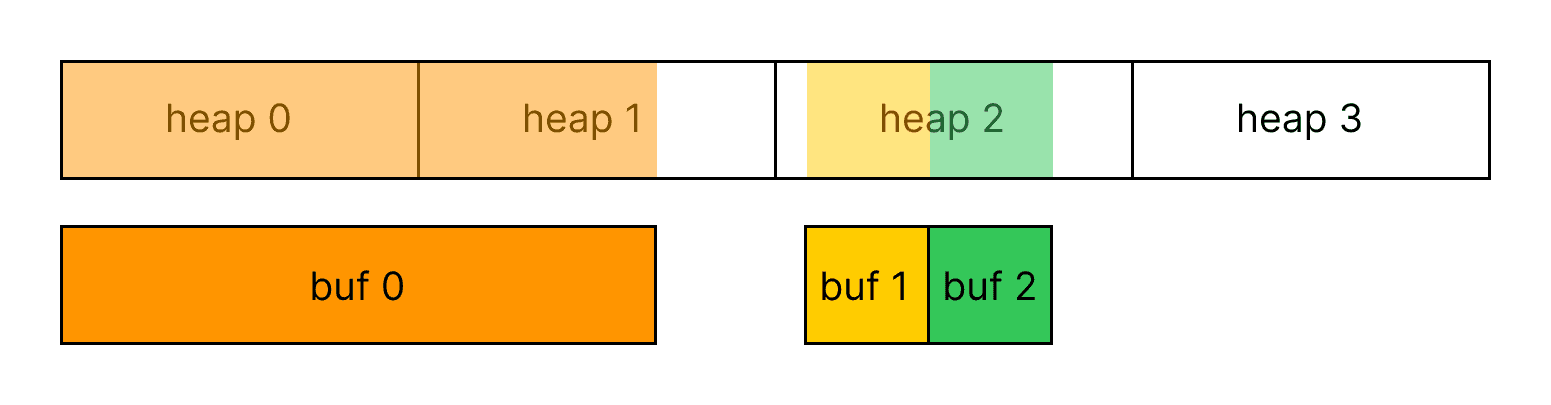
Multiple sparse buffers mapped across multiple placement heaps

There is also no restriction on which heaps a single buffer maps into, so a new buffer such as buf 3 can be mapped across free pages in existing heaps to avoid fragmentation.
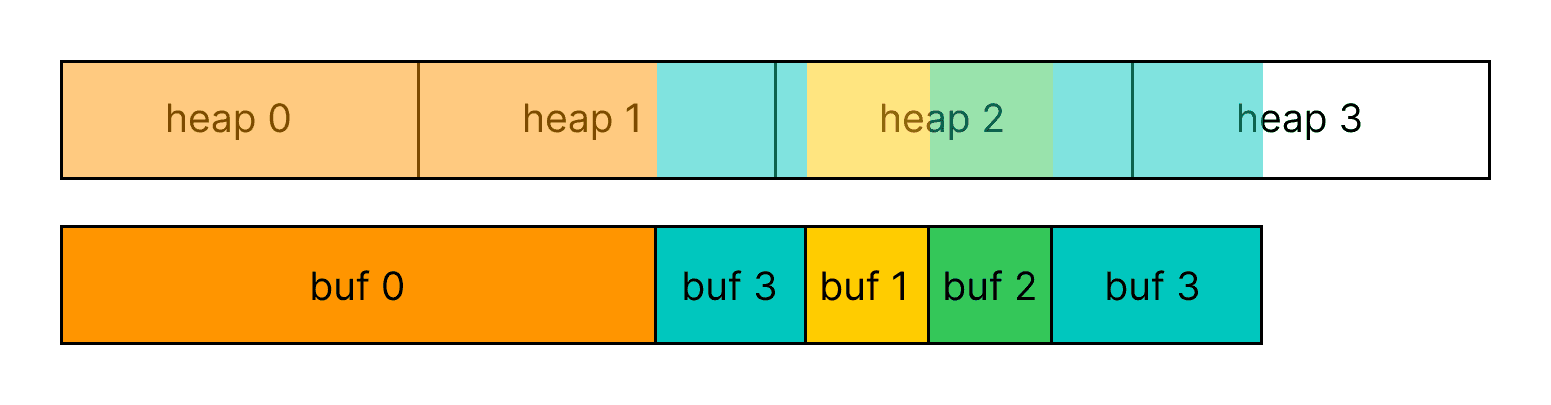
A new sparse buffer mapped to free pages in existing placement heaps

This lets us create a pool of heaps, map buffers to them, unmap buffers from them, add new heaps when there are no free pages left in the pool, and remove a heap from the pool once no pages are mapped to it.

What this looks like in uzu

uzu is a high-performance LLM inference engine focused on efficient on-device inference for chat-style workloads. Long-term, we're aiming for a runtime that supports: aggressive prefix caching across turns and across requests, continuous batching of multiple in-flight sequences, and dynamic offloading of cold weights and embeddings. All three of those need a cache that can reserve large virtual ranges without paying physical cost up front, share pages across logical buffers, and unmap pages that have rolled out of scope. Sparse buffers are the substrate that makes the rest tractable.

What we changed

The previous implementation pre-allocated a dense buffer per layer at the model's maximum context size. That's a one-time decision: at session start, on a 32k context model, you committed the full 4.5 GiB up front (for Qwen3-4B fp16 KV) whether the user typed one sentence or filled the window.

The current implementation replaces dense buffers with sparse ones backed by a shared heap pool. The KV cache layer keeps the same interface to the attention kernel, but the physical backing now grows page-by-page as the sequence advances.

The architecture has three things worth naming:

  1. A sparse heap wraps a single 64 MiB heap and tracks which pages within are in use.

  2. A heap pool owns a list of sparse heaps and grows the list when more physical pages are needed.

  3. A sparse buffer wraps the buffer for one (K or V) of one layer and tracks which page ranges are currently mapped.

Before each forward pass, the cache layer computes the row range that pass will touch, converts rows to pages, diffs against the buffer’s already-mapped set, and submits only the new mappings. Pages that were already mapped from previous tokens don’t get remapped. Over a long session the number of mapping operations is proportional to the number of 256 KiB page boundaries crossed, not the number of tokens generated.

Devices that don't support placement sparse resources fall back to the previous dense allocation behind the same trait, so nothing in the attention kernel above the cache layer changes.

Result: physical memory vs. dense pre-allocation

For a 32 k-context Qwen3-4B session, the difference looks like this:

Qwen3-4B bf16 KV: committed memory vs sequence length(32k-context model)012345050001000015000200002500030000Pre-allocate max (dense)Sparse buffers (uzu)Sequence length (tokens)Committed physical memory (GB)

The dense line is what llama.cpp and the previous uzu implementation commit at startup: a KV buffer sized to the configured context length, allocated and zeroed once when the inference context is created, regardless of how much of it the user's conversation actually fills. The sparse line is what uzu commits now: roughly linear in the current sequence length, rounded up to the next 256 KiB page per (K, V) per layer.

In practice that means a typical chat session of a few hundred to a few thousand tokens commits a few hundred MiB of KV cache instead of multiple GiB. The savings show up as headroom for other applications on the device — which is the entire point of on-device inference.


Future work

Our future plans build more mechanics on top of sparse buffers. So beyond being a KV-cache optimization, they become a primitive for broader runtime memory management.

Continuous batching

Different in-flight sequences can have wildly different lengths without paying batch-wide padding cost — each sequence gets its own sparse buffer, mapped only to its own length. A sequence finishes, its pages return to the pool, a new sequence claims them.

PagedAttention-style block tables

The current KV-cache implementation gives us cheap allocation and per-page sharing within a single session. But two concurrent sessions with the same system prompt still get separate physical pages for the shared prefix. A thin block-table layer on top of sparse buffers could fix this redundant allocation. The idea is to maintain a pool of shared pages that multiple session-level virtual buffers can map to the same physical address, plus a copy-on-write path for the first divergent token. The attention kernel keeps reading from a flat contiguous buffer. The page table just happens to point both buffers’ system-prompt pages at the same physical RAM.

Per-layer embeddings with on-demand paging.

Gemma 3n introduces large per-layer embedding tables that are accessed sparsely and are explicitly designed to live in slower memory most of the time. With sparse buffers we can reserve their full virtual range, page in just the rows referenced by the current token, and page them back out. Without sparse buffers the choice is commit all of them or treat each embedding as a separate small buffer and live with the indirection cost.

Selective weight loading, in the spirit of “LLM in a Flash”

The 2023 Apple paper (Alizadeh et al.) showed that on a typical decode step, only a small fraction of an FFN's columns are actually activated. The rest are zeroed out by the non-linearity. A small predictor can determine which columns will be active before the matmul runs. The implication for memory: most of the model’s weight memory doesn’t need to be resident at any given step, only what the predictor selects. Sparse buffers extend the same idea we’ve applied to KV onto the weight tensors themselves: reserve the full virtual range of each FFN’s projection matrices, page in only the predicted-active columns from a slower tier (host RAM or flash), and unmap them when the next step's prediction shifts. A model that doesn't fit in device RAM at all becomes runnable, with a latency cost proportional to how many predictor misses we tolerate per token.

Conclusion

The thread across all future work ideas is the same one the rest of this article has been making: the right abstraction for on-device LLM memory is virtual memory, and using the GPU’s MMU directly — rather than rebuilding a software equivalent for every kind of tensor — keeps the attention kernel simple, the runtime small, and the resident memory honest. Sparse buffers started as a KV-cache fix. What they’re becoming is the substrate that unifies KV, embeddings, and weights under one paging story.

By Aleksandr Golokoz, Engineer at Mirai labs

Jun 7, 2026

Introduction

Running LLMs on a phone, a laptop, or any device that isn't a data-center GPU shares a single hardest constraint — resident memory. The amount of RAM a model uses while running determines whether it can be loaded at all.

Resident memory occupied during an LLM run has two components:

  1. Weights are the model parameters. Their size is fixed and depends on the architecture and the quantization scheme.

  2. KV cache (Key-Value cache) is the attention mechanism’s working memory, filled as the model processes tokens. For every token, every transformer layer caches its key and value projections so it can read them back later, which shortens decoding.

KV cache on each layer has shape

[sequence_length, num_kv_heads, head_dim]
sequence_length — number of tokens currently in the cache, grows by one per decoded token.
num_kv_heads — number of independent K (and V) vectors stored per token at this layer.
head_dim — width of each per-head K (and V) vector, fixed by the architecture.

Across all layers, the number of bytes per token is

2 * num_layers * num_kv_heads * head_dim * element_size_bytes
2 is for keys and values

KV cache grows linearly with the conversation, and for modern long-context models it becomes the single largest allocation. Let’s look at how resident memory splits across different context lengths.

Below is the breakdown for Qwen3-4B across different context lengths. This model has 36 transformer layers, 8 KV heads, and a head dimension of 128, with ~4B parameters.

Qwen3-4B resident memory: weights vs KV cache(bf16 baseline — unquantized)Weights (bf16)KV cache (bf16)0510152025307.7 GB2k8.0 GB4k8.6 GB8k9.7 GB16k12.0 GB32k16.5 GB64k25.5 GB128kContext length (tokens)Resident memory (GB)

Weights take up 7.45 GiB. From the formula above, one token takes up 147,456 B = 144 KiB of KV cache.

To run such large models, memory consumption has to be reduced. One way is quantization — of both the weights and the KV cache.

Qwen3-4B: how much each quantization choice buys you02468101214bf16 w / bf16 KV12.0 GBq8 w / bf16 KV8.2 GBq4 w / bf16 KV6.7 GBq4 w / q8 KV4.5 GBq4 w / q4 KV3.4 GBResident memory at 32k context (GB)WeightsKV cache (32k ctx)

Beyond quantization, there is a growing literature on KV compression — token eviction (H2O), attention-sink-aware sliding (StreamingLLM), low-rank projection (DMC, MLA), and learned routers. These approaches change the data that lives in the cache.

Why the layout matters beyond just size

Two KV-cache optimization techniques are worth mentioning:

  1. Prefix caching. If two requests share a prefix — e.g. a system prompt — the KV cache for those tokens is identical and can be reused. In chat apps, where each turn is a continuation of the previous one, a good prefix cache is the difference between sub-second and multi-second time to first token.

  2. KV cache offloading. For very long contexts, the cache for tokens far behind the current position can be moved to slower memory and brought back only when those parts are needed. This trades latency for the ability to handle contexts that wouldn’t fit in memory.

llama.cpp splits the work across two layers. The library handles per-buffer mechanics — KV quantization down to 4 bits, per-layer GPU-host offload, in-buffer position shifting for prefix realignment, and specialized cache implementations for sliding-window attention, Mamba/SSM hybrids, and DeepSeek sparse attention. The server adds the orchestration: continuous batching, longest-common-prefix routing to reuse sessions with matching KV, per-session checkpoints for sliding-window recovery, host-RAM LRU eviction of idle sessions, and on-disk save/restore.

mlx-lm has converged on a comparable design from a different starting point. Its server runs a continuous-batching scheduler that merges and extracts per-sequence caches as requests join and leave. On top of that, the process holds a prompt cache indexed by a token trie that can trim a longer cached sequence back to a shorter incoming prefix, with eviction tiered by message role so system prompts survive longer than assistant continuations. It ships specialized per-layer caches for sliding-window attention, Llama-4-style chunked attention, and Mamba/SSM hybrids. It applies 4- or 8-bit KV quantization lazily once a session crosses a token threshold, and it supports on-disk save and reuse across runs.

All of that machinery sits on top of the same KV layout: per-layer contiguous tensors, with no block table, no page sharing across sessions, no virtual-to-physical mapping. Two requests with a shared system prompt cannot share arbitrary physical bytes at page granularity — mlx-lm deep-copies on every cache hit. llama.cpp comes closer: its slots are co-located in one buffer, and seq_cp lets several sequences co-own the same cells without copying — but that aliasing is all-or-nothing per sequence, not the sub-sequence, page-level sharing a block table would give you. Sliding-window layers in both projects fall back to ring buffers with explicit modular writes, not page unmapping. Above that shared layout, the two projects pay for it in different ways: llama.cpp pre-allocates the maximum context per layer at session start — predictable, no mid-decode reallocations, but it commits gigabytes the user may never spend. mlx-lm grows its KV cache in 256-token chunks — proportional to current sequence length, but every chunk boundary copies the existing KV into a fresh, larger buffer, an unpredictable latency spike that scales with the cache's size. Both are local optima on a contiguous layout. Neither escapes it. The machinery on top is impressive. The layout is the constraint, and removing it is what the rest of this article is about.

Problems with a naive layout

  1. Unknown context length in advance.
    Before a session starts, nobody knows the input size — one sentence or a 30k-token document. The two ways out — pre-allocate the maximum or grow-and-copy — both have drawbacks: gigabytes of unused RAM, or latency spikes during decode.

  2. Sequences in a batch have different lengths.
    Batching lets you saturate GPU bandwidth. But if you batch N sequences and lay out the KV cache as [N, max_seq_len, …], every short sequence pays for the longest. With realistic chat traffic, that's mostly padding.

  3. Sliding-window attention is genuinely painful.
    Sliding-window attention is used by Gemma 2, Gemma 3, Phi-3, and several other modern architectures. The textbook implementation is a ring buffer with a modular write pointer — which means every read becomes a gather with index arithmetic, and combining it with prefix caching (where the "head" of the ring belongs to a shared parent) requires careful scatter logic and is easy to get subtly wrong.

The rest of the article will be about how to solve all these problems.

PagedAttention

The first widely adopted solution to these problems was PagedAttention, from the vLLM team. The core idea is borrowed straight from operating systems. Physical KV memory is divided into fixed-size blocks of 16–32 tokens. Each request gets a block table — an array that maps logical block indices to physical blocks, exactly like a CPU page table maps virtual to physical addresses:

Request A                   Request B
(system prompt + user A)    (same system prompt + user B)

logical 0  physical 4    logical 0  physical 4   shared
logical 1  physical 5    logical 1  physical 5   shared
logical 2  physical 7    logical 2  physical 11  diverged
logical 3  physical 2    logical 3  physical 9

Two requests with the same system prompt point to the same physical blocks for that prefix. Beam-search beams share blocks until they diverge. Internal fragmentation collapses from max_seq_len - actual_seq_len per request to "at most one partial block at the tail." When a block needs to be written by one of two sharers, it's copied first — copy-on-write, again straight from OS design.

What's harder is that this is all done in software. The attention kernel has to be rewritten to follow the block-table indirection: it becomes a loop that gathers K and V from non-contiguous physical blocks. vLLM ships a custom CUDA kernel for exactly this. A scheduler on the side allocates blocks, reference-counts them, and can preempt low-priority requests by swapping their blocks to host memory or recomputing them.

That works wonderfully for a server. For an on-device engine on Apple Silicon it's a lot of machinery to maintain — and we don't have CUDA. But the underlying observation is the right one: what the KV cache really wants is virtual memory.

So the question becomes: do we have to build virtual memory in software, or can we use the virtual memory that already exists in hardware?

Virtual Memory and the GPU's MMU

On a CPU, programs don’t touch physical RAM directly. They operate on virtual memory. A dedicated hardware unit, the MMU (memory management unit), consults page tables to translate each virtual address into a physical one. If a program touches a virtual address that belongs to a region it has already reserved — via mmap, malloc, etc. — but doesn't yet have a physical page behind it, the MMU raises a fault, the OS allocates a fresh page on the fly, installs the mapping, and resumes execution at the faulting instruction. The crucial property is that the program never knows. It sees one contiguous address range. Physical RAM gets attached lazily, on demand, in fixed-size pages (typically 4 KiB or 16 KiB).

GPUs have an MMU too, just like CPUs. Apple Silicon’s unified memory system, NVIDIA’s H100, AMD’s RDNA — all of them have hardware page tables and translation buffers, and they are used continuously to back the buffers your kernels read from. What’s comparatively new is exposing this mechanism to applications: letting you create a buffer whose virtual address range is reserved without any physical pages behind it, then map and unmap individual pages from the application.

Once you can do that, the PagedAttention picture becomes nearly free:

  • The “block table” becomes the GPU’s page table. No software indirection in the kernel — it now reads from what looks like a flat contiguous buffer, and page-table walking is handled by the MMU.

  • Prefix sharing becomes mapping the same physical page into two different virtual buffers.

  • Sliding window becomes unmapping the page that just slid off the back of the window. No ring buffer, no modulo arithmetic, no scatters. The attention kernel keeps reading positions [start, end), and whatever is outside the range simply isn’t backed by physical memory.

  • Offloading large, infrequently touched buffers becomes a matter of unmapping device pages and re-mapping them when needed, without changing the buffer pointer.

This is what Apple calls placement sparse buffers in Metal, and it's the primitive uzu now uses for its KV cache.

Metal Sparse Buffer API

A small terminology trap: Metal has two related features. MTLHeapType.sparse is for textures, while MTLHeapType.placement is the one for buffers. For KV cache you want placement heaps.

Two terms up front. A sparse buffer is a buffer whose virtual address range exists but has no physical memory behind it until you explicitly back individual pages. A placement heap is a pool of physical memory you allocate yourself and then map, page by page, into those sparse buffers. So the sparse buffer is the address space, the placement heap is the physical pages, and mapping connects the two.

Starting from Metal 4, devices that support placement sparse resources can use sparse buffers as growing arrays without copy operations. This is a hardware capability, not just an SDK version switch, so check it at runtime before using the API:

MTLDevice.supportsPlacementSparse: Bool

The workflow has three steps: create a sparse buffer, create a placement heap, and map pages. Let’s take a closer look at each.

Step 1: Create sparse buffer

Let’s start with a default CPU-accessible 128 MiB buffer allocation:

import Metal

let device = MTLCreateSystemDefaultDevice()!

let bufferSize = 128 * 1024 * 1024
let denseBuffer = device.makeBuffer(
    length: bufferSize,
    options: .storageModeShared
)

You can watch memory consumption with the vmmap utility:

> vmmap -summary PID

                                VIRTUAL RESIDENT    DIRTY
REGION TYPE                        SIZE     SIZE     SIZE

IOAccelerator (graphics)         128.4M      64K      64K

Virtual size — the address space reserved by the process. It does not mean the process is actually using that much physical RAM. A large virtual region may be unmapped-on-demand, shared, compressed, swapped out, or never touched.
Resident size — the portion of that virtual memory that currently has physical memory backing it and is present in RAM. This is closer to “how much real memory is involved right now,” but it can include shared pages, so it is not always equal to private RAM cost.
Dirty size — resident memory that has been modified and cannot simply be discarded/reloaded from the original file. Dirty pages usually represent private heap/stack data, copy-on-write pages that were written to, or modified file-backed mappings. Dirty memory is often the most important number when estimating how much memory the process uniquely pressures the system with.


Now let’s consider how to create sparse buffer

let sparsePageSize = MTLSparsePageSize.size256
let sparseBuffer = device.makeBuffer(
    length: bufferSize,
    options: .storageModePrivate,
    placementSparsePageSize: sparsePageSize
)

MTLSparsePageSize — size in kilobytes.

The MTLResourceOptions.storageModePrivate flag makes this buffer GPU-private, which is faster for compute but requires explicit synchronization for CPU access. In the KV-cache case, CPU access doesn’t matter, since reads and writes happen only in kernels. Note that after buffer creation there is no 128 MiB allocation.

> vmmap -summary PID

                                VIRTUAL RESIDENT    DIRTY
REGION TYPE                        SIZE     SIZE     SIZE

IOAccelerator (graphics)           384K      64K      64K

owned unmapped (graphics)        512.0M      16K      16K

Specifying placementSparsePageSize makes this buffer sparse. It’s not possible to create a sparse buffer with the MTLResourceOptions.storageModeShared option.

Just after buffer creation, buffer reads return zeros and writes are no-op.

Step 2: Create placement heap

Let’s create a heap of 512 MiB:

let heapDesc = MTLHeapDescriptor()
heapDesc.maxCompatiblePlacementSparsePageSize = sparsePageSize
heapDesc.size = 512 * 1024 * 1024
heapDesc.sparsePageSize = sparsePageSize
heapDesc.storageMode = .private
heapDesc.type = .placement
let heap = device.makeHeap(descriptor: heapDesc)

Same as for the buffer, MTLStorageMode must be private. As for MTLHeapType, it must be placement since sparse is used for textures.

Now vmmap shows the following:

> vmmap -summary PID

                                VIRTUAL RESIDENT    DIRTY
REGION TYPE                        SIZE     SIZE     SIZE

IOAccelerator (graphics)           384K      64K      64K

owned unmapped (graphics)        512.0M      16K      16K

owned unmapped (graphics) — graphics-related memory that is charged to your process, but is not currently mapped into your process’s virtual address space as a normal CPU-visible region.

The heap exists and is charged to the process as graphics memory, but it is not mapped into the CPU-visible address space and does not appear as resident memory in this measurement yet.

Step 3: Mapping

The point of the operation is to map parts (pages) of the buffer to the heap. Reads and writes on mapped buffer pages then behave as expected. To execute a mapping or unmapping, you need an MTL4CommandQueue object.

let sparsePageSizeBytes = 256 * 1024
let totalSparseBufferPages = sparseBuffer.length / sparsePageSizeBytes
let operation = MTL4UpdateSparseBufferMappingOperation(
    mode: .map,
    bufferRange: NSRange(location: 0, length: totalSparseBufferPages),
    heapOffset: 0
)

let commandQueue4 = device.makeMTL4CommandQueue()!
commandQueue4.updateMappings(
    buffer: sparseBuffer,
    heap: heap,
    operations: [operation]
)

updateMappings takes an array of MTL4UpdateSparseBufferMappingOperation.

It’s important to note that bufferRange and heapOffset are counted not in bytes, but in pages. bufferRange specifies which pages of the buffer will be mapped (or unmapped). heapOffset specifies the heap offset, in pages, that the buffer will be mapped to (or unmapped from). mode can be only map or unmap.

The mapping operation is enqueued on the GPU timeline. It’s asynchronous with respect to CPU code, but Metal guarantees that the mapping completes before any subsequent command buffer on the same MTL4CommandQueue accesses those pages. If compute work is submitted through MTLCommandQueue, you must explicitly synchronize it with the MTL4CommandQueue mapping work before those command buffers access the mapped pages.

After mapping, you can use the sparse buffer like an ordinary buffer.

Additional features

It’s worth noting that a single MTLBuffer can be mapped to one or more MTLHeap instances, and a single MTLHeap can have one or more MTLBuffer instances mapped into it, as shown in the picture.

Multiple sparse buffers mapped across multiple placement heaps

There is also no restriction on which heaps a single buffer maps into, so a new buffer such as buf 3 can be mapped across free pages in existing heaps to avoid fragmentation.

A new sparse buffer mapped to free pages in existing placement heaps

This lets us create a pool of heaps, map buffers to them, unmap buffers from them, add new heaps when there are no free pages left in the pool, and remove a heap from the pool once no pages are mapped to it.

What this looks like in uzu

uzu is a high-performance LLM inference engine focused on efficient on-device inference for chat-style workloads. Long-term, we're aiming for a runtime that supports: aggressive prefix caching across turns and across requests, continuous batching of multiple in-flight sequences, and dynamic offloading of cold weights and embeddings. All three of those need a cache that can reserve large virtual ranges without paying physical cost up front, share pages across logical buffers, and unmap pages that have rolled out of scope. Sparse buffers are the substrate that makes the rest tractable.

What we changed

The previous implementation pre-allocated a dense buffer per layer at the model's maximum context size. That's a one-time decision: at session start, on a 32k context model, you committed the full 4.5 GiB up front (for Qwen3-4B fp16 KV) whether the user typed one sentence or filled the window.

The current implementation replaces dense buffers with sparse ones backed by a shared heap pool. The KV cache layer keeps the same interface to the attention kernel, but the physical backing now grows page-by-page as the sequence advances.

The architecture has three things worth naming:

  1. A sparse heap wraps a single 64 MiB heap and tracks which pages within are in use.

  2. A heap pool owns a list of sparse heaps and grows the list when more physical pages are needed.

  3. A sparse buffer wraps the buffer for one (K or V) of one layer and tracks which page ranges are currently mapped.

Before each forward pass, the cache layer computes the row range that pass will touch, converts rows to pages, diffs against the buffer’s already-mapped set, and submits only the new mappings. Pages that were already mapped from previous tokens don’t get remapped. Over a long session the number of mapping operations is proportional to the number of 256 KiB page boundaries crossed, not the number of tokens generated.

Devices that don't support placement sparse resources fall back to the previous dense allocation behind the same trait, so nothing in the attention kernel above the cache layer changes.

Result: physical memory vs. dense pre-allocation

For a 32 k-context Qwen3-4B session, the difference looks like this:

Qwen3-4B bf16 KV: committed memory vs sequence length(32k-context model)012345050001000015000200002500030000Pre-allocate max (dense)Sparse buffers (uzu)Sequence length (tokens)Committed physical memory (GB)

The dense line is what llama.cpp and the previous uzu implementation commit at startup: a KV buffer sized to the configured context length, allocated and zeroed once when the inference context is created, regardless of how much of it the user's conversation actually fills. The sparse line is what uzu commits now: roughly linear in the current sequence length, rounded up to the next 256 KiB page per (K, V) per layer.

In practice that means a typical chat session of a few hundred to a few thousand tokens commits a few hundred MiB of KV cache instead of multiple GiB. The savings show up as headroom for other applications on the device — which is the entire point of on-device inference.


Future work

Our future plans build more mechanics on top of sparse buffers. So beyond being a KV-cache optimization, they become a primitive for broader runtime memory management.

Continuous batching

Different in-flight sequences can have wildly different lengths without paying batch-wide padding cost — each sequence gets its own sparse buffer, mapped only to its own length. A sequence finishes, its pages return to the pool, a new sequence claims them.

PagedAttention-style block tables

The current KV-cache implementation gives us cheap allocation and per-page sharing within a single session. But two concurrent sessions with the same system prompt still get separate physical pages for the shared prefix. A thin block-table layer on top of sparse buffers could fix this redundant allocation. The idea is to maintain a pool of shared pages that multiple session-level virtual buffers can map to the same physical address, plus a copy-on-write path for the first divergent token. The attention kernel keeps reading from a flat contiguous buffer. The page table just happens to point both buffers’ system-prompt pages at the same physical RAM.

Per-layer embeddings with on-demand paging.

Gemma 3n introduces large per-layer embedding tables that are accessed sparsely and are explicitly designed to live in slower memory most of the time. With sparse buffers we can reserve their full virtual range, page in just the rows referenced by the current token, and page them back out. Without sparse buffers the choice is commit all of them or treat each embedding as a separate small buffer and live with the indirection cost.

Selective weight loading, in the spirit of “LLM in a Flash”

The 2023 Apple paper (Alizadeh et al.) showed that on a typical decode step, only a small fraction of an FFN's columns are actually activated. The rest are zeroed out by the non-linearity. A small predictor can determine which columns will be active before the matmul runs. The implication for memory: most of the model’s weight memory doesn’t need to be resident at any given step, only what the predictor selects. Sparse buffers extend the same idea we’ve applied to KV onto the weight tensors themselves: reserve the full virtual range of each FFN’s projection matrices, page in only the predicted-active columns from a slower tier (host RAM or flash), and unmap them when the next step's prediction shifts. A model that doesn't fit in device RAM at all becomes runnable, with a latency cost proportional to how many predictor misses we tolerate per token.

Conclusion

The thread across all future work ideas is the same one the rest of this article has been making: the right abstraction for on-device LLM memory is virtual memory, and using the GPU’s MMU directly — rather than rebuilding a software equivalent for every kind of tensor — keeps the attention kernel simple, the runtime small, and the resident memory honest. Sparse buffers started as a KV-cache fix. What they’re becoming is the substrate that unifies KV, embeddings, and weights under one paging story.

Models, runtime & infrastructure to make on-device AI interactive, ambient & continuous.

Models, runtime & infrastructure to make on-device AI interactive, ambient & continuous.